Mac vs PC for Auckland
Remote Workers
Mac vs PC for Auckland Remote Workers: Which is Best for Productivity?
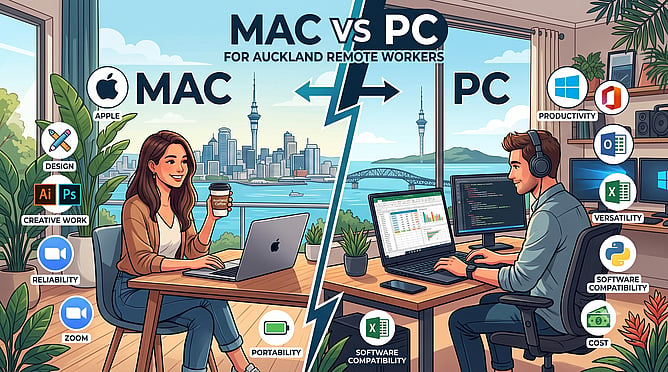
The remote work revolution has changed how Aucklanders do business. Whether you are working from a home office in Manukau or hot-desking in Central Auckland, your computer is your lifeline. When it comes to choosing your primary work machine, the age-old debate always returns: Should you buy an Apple Mac or a Windows PC?
Both platforms have evolved significantly, and the right choice ultimately depends on your specific workflow, budget, and software requirements. Let's look at how they stack up across the key categories that matter most to remote workers.
Performance and Everyday Reliability
Apple's modern chips have set a new benchmark for laptop performance. Macs are incredibly fast, whisper-quiet, and offer exceptional battery life, making them ideal if you like to work from local cafes without constantly hunting for a power outlet.
On the flip side, Windows PCs offer unmatched variety. From lightweight ultrabooks to high-powered workstations, you can find a PC tailored precisely to your needs. Modern Windows machines are lightning-fast and excel at running heavy database software, financial tools, and multitasking across multiple monitors.
Software Compatibility
Historically, certain industries were strictly locked into one platform. Today, the gap is much smaller. Most major business tools, including Microsoft 365 and web-based applications, run flawlessly on both Mac and PC.
However, if your daily work involves heavy creative tasks like high-end graphic design, video editing, or audio production, the Mac ecosystem remains an industry favorite. If your role relies on specialized corporate databases, proprietary accounting software, or engineering tools, a Windows PC is often the more straightforward, headache-free choice.
Upgrades, Maintenance, and Value for Money
When it comes to upfront costs and flexibility, PCs generally take the win. You can get a highly capable Windows laptop for a lower price point than an entry-level Mac. Furthermore, many desktop PCs and some laptops allow you to upgrade components like storage and memory down the road, extending the machine's lifespan.
Macs carry a premium price tag, but they hold their resale value exceptionally well and boast excellent hardware build quality. The downside is that modern Macs cannot be upgraded after purchase, meaning you must choose your specifications carefully from day one.
Getting the Right Support for Your Setup
No matter which operating system you choose, hardware faults, software glitches, and network issues can bring your workday to a sudden halt. That is where having a reliable, local IT partner makes all the difference.
At BillyTec, we provide expert support and repairs for both Mac and PC platforms across Auckland. Whether your Windows laptop needs malware removal or your MacBook requires a hardware diagnosis, we ensure your remote work setup runs reliably day in and day out.
Need help choosing the right computer or resolving a frustrating technical issue?
Contact BillyTec today for fast, professional computer repairs and local IT advice.